How a Page Is Assembled
The page-building half of Kugel Platform: sections and the eight page types, copy-not-inherit recipes, live navigation and shared sections, the three ways to place a section, the composition rules, and who may build.
6 min read By Platform documentation desk Guide #Architecture #Publishing
Outcome
A page is an ordered list of sections
A page on Kugel Platform is a governed object, not a file. It holds a route, a page type, a title, search settings and an ordered list of sections. The renderer walks that list and produces the page. Nothing else decides what appears.
That makes page building predictable. You can read a page's shape without opening a browser, and you change it with typed operations, such as adding, moving, replacing or removing a section, or editing one field inside one, rather than by editing markup.
Articles are the other half of the system: an article holds its own ordered list of nodes under its own contract. The two meet at the edges. A listing page lists articles, and an article page renders one.
Checked against the live system and the engine code on 15 October 2026. Counts are snapshots; read the contract again before relying on one.
Core terms
Sections, page types and recipes
Section. One block of a page, with a type and its own id. There are 29 registered section types, from hero, lede and prose to pricing table, FAQ, testimonial, comparison table, stats, timeline, before-and-after and a sticky call to action. Every one of them can be placed directly on a page.
Composed section. The section type that arranges typed building blocks into layouts the named types cannot express. Primitives, Recipes, Promotion covers it in detail.
Page type. Eight types decide where a page lives and what it must contain. Home must open with a hero. Standard is the ordinary content page. System covers fixed pages such as the 404 and privacy pages. Listing must open with a lede, because its header comes from it. Content detail is the article page, where sections are optional extras after the article. Clone holds captured pages. Campaign landing and campaign step are served under /go/ and publish as snapshots.
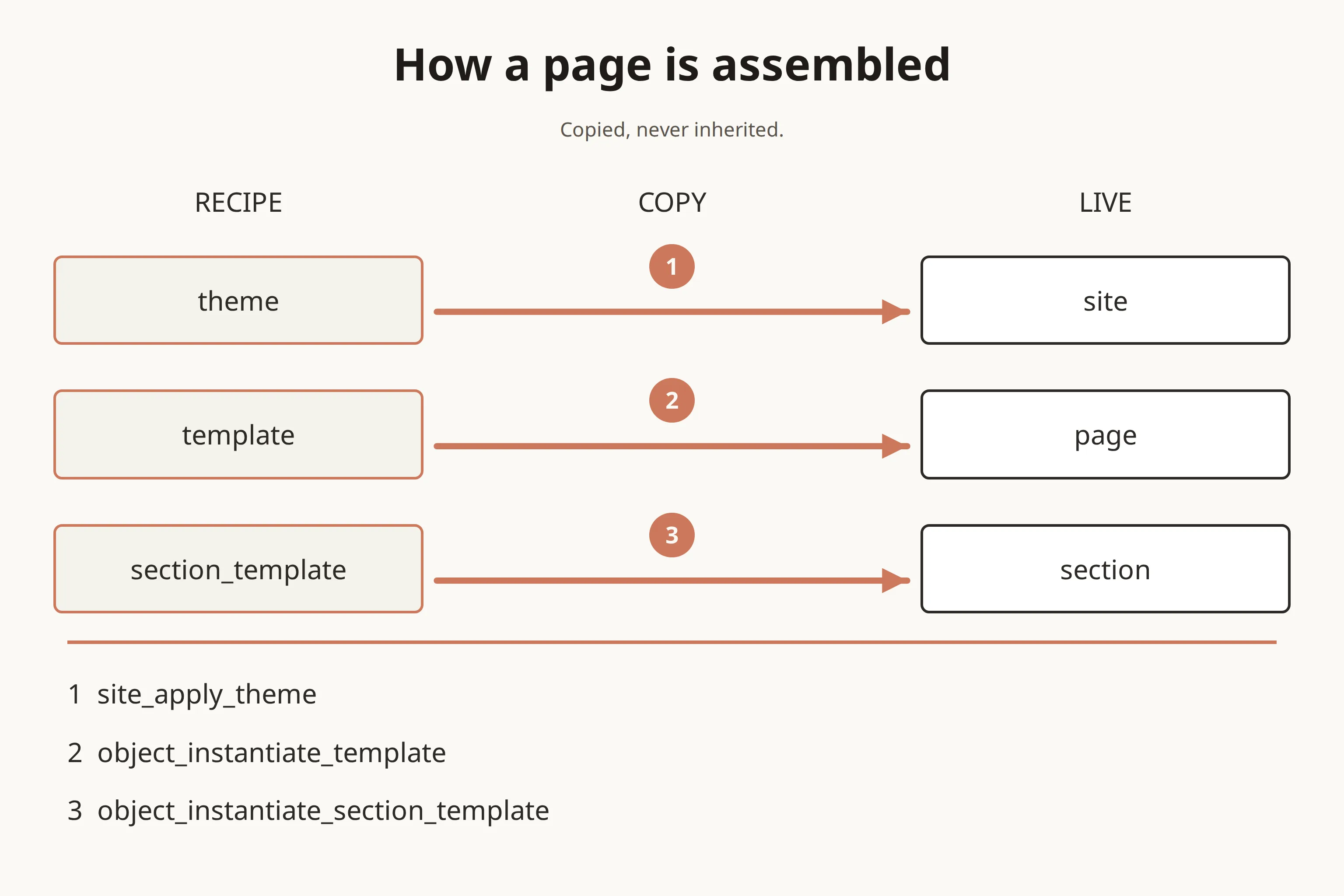
Theme. A named set of colour and font tokens plus a few bounded layout choices. It renders nothing by itself; applying it copies its values onto the site.
Template and section template. Recipes for a whole page and for one section.
Shared section. A standalone section object that several pages can point at.
Relationship
Recipes are copied, never inherited
Applying a theme copies its tokens onto the site, and colours the theme does not set are cleared rather than kept. Building a page from a template copies each slot's blueprint into the new page. Stamping a section template copies its blueprint into a page with a fresh section id. The page records which recipe it came from, as history only.
The consequence: editing a recipe changes what future pages start from and never touches a page that already exists. If twelve pages were built from one template and the template changes, those twelve pages do not move.
Two things do stay linked. Navigation is referenced live: a page names its header and footer menus, so publishing a changed menu changes every page that uses it. A shared section is referenced live too: edit it, and every page pointing at it changes.
Taxonomy does not attach to a page. Categories and tags live on articles, and pages reach them through listing pages, content grids that query articles, or links to a topic. A page has no theme of its own either; theming belongs to the site.
Example
Three ways to place a section, and when each is right
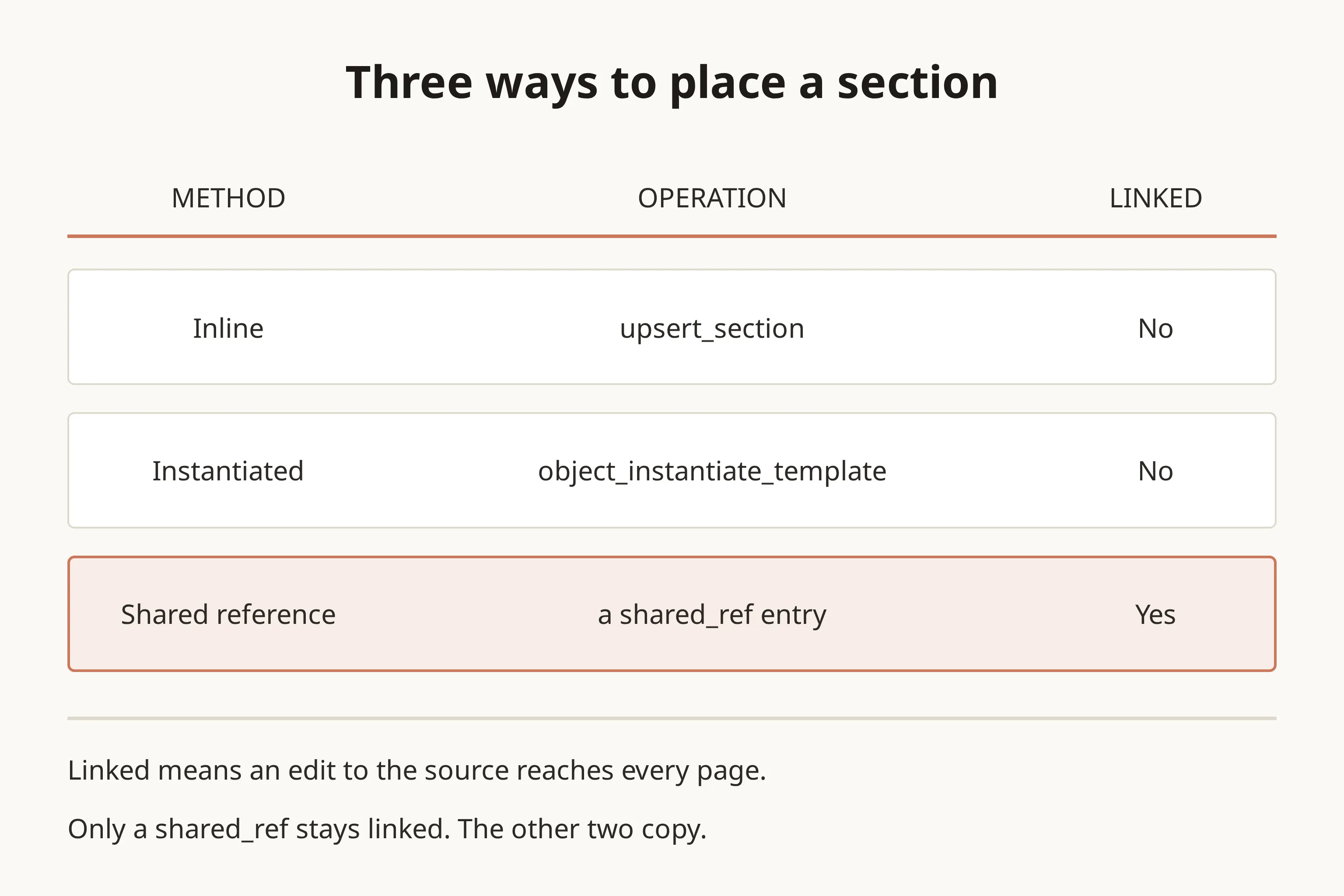
There are three ways to get a section onto a page, and they differ in who owns the content afterwards.
1. Inline. Write the section straight into the page. The content belongs to that page alone. This is the right choice for most sections.
2. From a recipe. Build a whole page from a template, or stamp one section from a section template. Both copy, and both can be previewed as a dry run first. Use them when a new page should start in the same shape as its siblings.
3. Shared. Point the page at a shared section object. This is the only way that stays linked, which suits a block that must stay identical everywhere, such as a disclaimer. A shared section holds one ordinary section and cannot point at another shared section.
Before creating a new recipe, check the library. The shared library holds 47 section recipes and 12 page recipes, among them DTC landing pages in two layouts, an offer page, an advertorial, a lead-magnet page, a topic hub and a thank-you page. Each recipe says when to use it, so one inventory read answers whether something already fits.
Boundary
What warns, what blocks publishing, what refuses the change
Composition rules do not all behave the same way. Some only warn, some save the page but stop it publishing, and some refuse the change outright.
Warn only. Hero and lede belong at the top of a page. Two neighbouring sections of the same kind are flagged, except prose and media. More than three asking sections (call-to-action banners, pricing tables and product previews) on one page are flagged; that limit is a site setting, not a fixed number. A page should hold at most one newsletter form, one contact form and one search box.
Block publishing. Each region of a page holds no more than it can, a page needs at least one visible section (an article page is the exception), and a page type's required section must be present: a hero on the home page, a lede on a listing page.
Refuse the change. Two sections with the same anchor are refused, because an anchor becomes the element's id and a link target. A section type the page type does not allow, a broken reference, a duplicate route and anything that breaks the page's schema are refused too.
One reporting detail can mislead: in a dry run of a draft, rules that only block publishing appear as warnings. An empty blocker list does not mean the page will publish.
Who may build. Creation is decided by role, not by the app you connect through. A member with the owner, admin, publisher or editor role, or an authorised agent, can create pages, recipes and themes, including from a chat-app connection. Promoting a site's own recipe into the shared library is reserved for an owner.
The next safe step is a dry run: validate a candidate page before creating it. It runs the same checks a real create would and writes nothing.