Finding and importing stock images: search, shortlist, licence and attribution
A runbook for the platform's stock image tools: running a search, reading the candidate bank, shortlisting and rejecting, importing from an address, and carrying licence and credit into the article, with the limits and failures seen on 2026-10-15.
15 min read By Platform Documentation Guide #Publishing
Runbook
A photograph with its rights attached
When an article needs a photograph and nobody on the team has one, the platform can look for it. A search checks the site's own media library first, then open-licence sources, scores what it finds, and stores up to five candidates under the article's request id. An editor, or an agent working for the editor, shortlists the good ones, rejects the rest and imports the one that is cleared. The licence and the credit stay attached to the stored file.
The tools do not judge whether a picture suits the article, and they cannot prove that a licence is genuine. They record what a provider, or the person importing, says it is. This runbook gives the safe order of work, what each step leaves behind, and what failure looks like. Every result quoted here was produced on 2026-10-15 for this article's own request.
Before you start
Prerequisites
Three things need to be in place before the first search.
An article to file the pictures under. Every search and import is recorded against a request id, and the request id must belong to a content object on the site. The examples here use this article's own request id, which existed before the first search.
A login that may write. Searching, importing, shortlisting and discarding are all writes. On 2026-10-15 the platform allowed 60 writes per member in any 10 minutes, counted across every write tool together. People or agents who share one login share that allowance.
Someone who owns the rights decision. The tools record a licence. They do not clear one. For an address you import yourself, the licence you state is stored exactly as you state it.
Settings and limits
The limits that govern a search
Read on 2026-10-15 from the site's image sourcing policy. Reading the policy changes nothing.
Providers. The site's own library and Openverse are on. Pexels, Unsplash and Google image search are off.
Volume. Three candidates per search by default, at most five kept per request, at most four searches per request, and at most ten results taken from each provider per search. The bank for this article's request holds six entries, four from the search and two from imports, so the limit of five appears to apply to search results only. That is inferred, not tested.
Licence. Public-domain, permissive and paid licences are allowed, commercial use must be allowed, and an unknown licence is excluded from search results.
Size. Images smaller than 640 by 480 pixels are excluded.
Scoring. A candidate is scored out of 1 from cost (weight 0.35), relevance to the words typed (0.30), image quality (0.20) and licence (0.15). The minimum score is 0.35.
Money. Paid imports are capped at zero.
Retention. A new candidate starts in the state kept.
Imports. At most 5,000,000 bytes per image and 2,048 pixels on the longest edge, at most 20 addresses per batch and 50 imports per request.
The policy is a project setting. Read it with get_image_search_policy; changing it takes set_image_search_policy, which this article does not use, and whether a change needs approval was not checked. A single search can also merge a partial policy over the stored one with policy_overrides for that call only. That option comes from the tool's own description and was not exercised here.
Safe sequence
The safe sequence
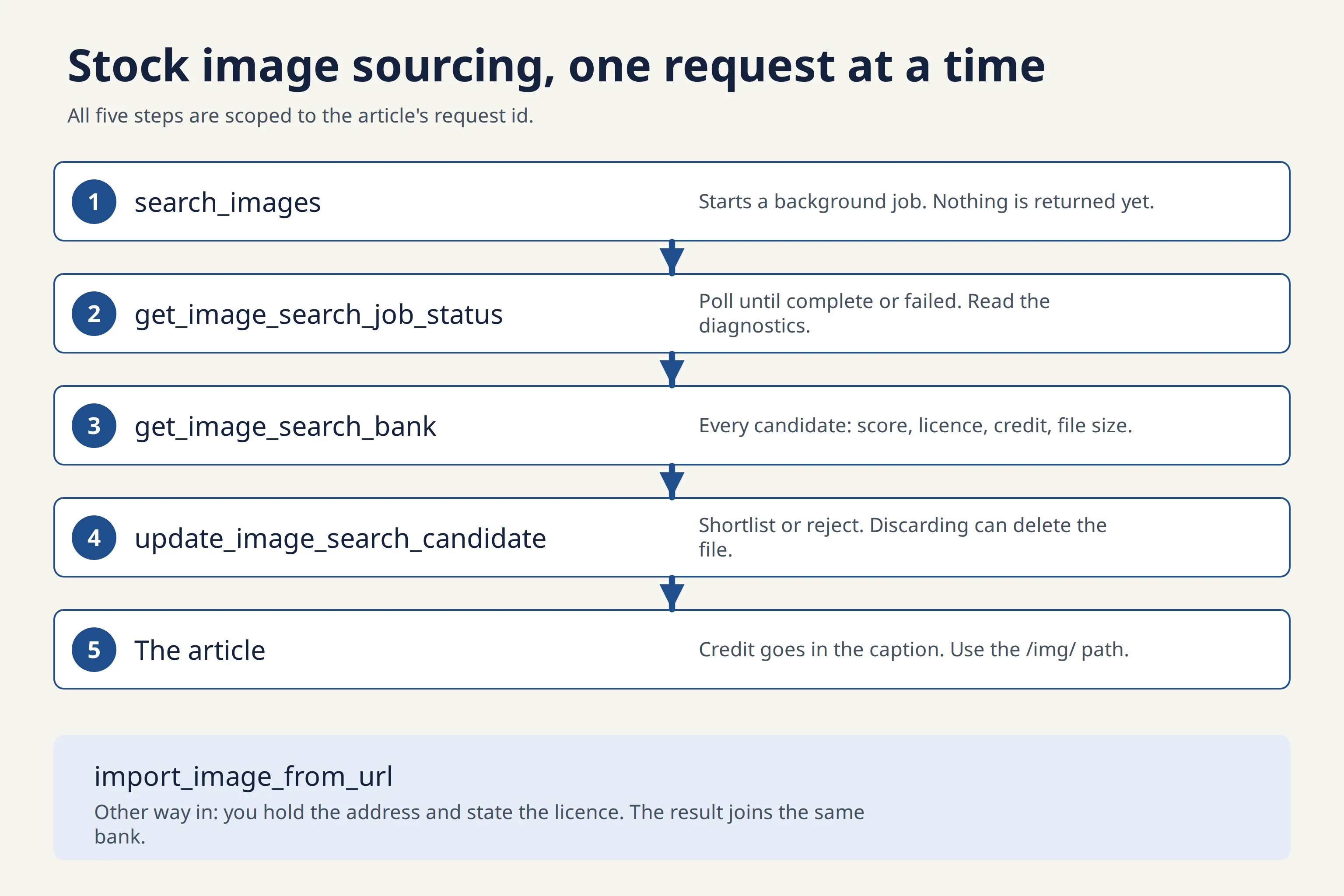
The diagram at the top of the page shows the same five steps. Import, the other way in, follows below. An agent working for an editor, such as the one that wrote this page through the platform's plugin, calls these tools in this order. Whether a particular admin chat agent holds them was not checked.
search_images. Give the site, the request id and a short query, and optionally a count from 1 to 5, a label and tags. The call returns a job id and nothing else. No image comes back.get_image_search_job_status. Poll every couple of seconds; the response recommends 2,000 milliseconds. Wait for complete or failed. The jobs here went from pending to running to complete. Complete only means the job finished, so read newCandidates and diagnostics before assuming anything was found.get_image_search_bank. The bank lists every candidate for the request and every search made for it, with state, score, licence, credit and the stored file's size.update_image_search_candidate. Set each candidate to selected, kept, pending_review or discarded, with a reason. Discarding with delete_artifact set to true also deletes the stored file.The article. Put the file's public address in an article node as an image, with alt text and a caption that carries the credit. The address has the form /img/, the request id, the file's fingerprint and its extension.
Import
The other way in: import from an address
If the picture is already known, for example a file a colleague found, skip the search and import it. import_image_from_url fetches one https address, caps the longest edge if you ask (max_dimension_px; the image is never cropped and never enlarged), stores the file under the request and adds it to the bank as a new candidate. It returns the stored file and its candidate id in the same call.
State the licence in that call: its class (public-domain, permissive, paid or unknown), its name, its link, the credit text, and whether commercial use is allowed. Leave it out and the licence is stored as unknown.
For several addresses, archives or folder pages there is import_images_from_url. It runs as a job you poll like a search. That description comes from the tool itself; the batch tool was not exercised in this session.
Example 1
Three searches, one useful result
The first brief was the one an editor would naturally type: editor working at a desk with printed proofs. The search ran against the library and Openverse and finished within a few seconds with no candidates and no diagnostics. A finished job with zero candidates is a normal outcome. Nothing in the response says whether the words were too specific, the licence filter removed everything, or there was no match.
The second try, proofreading desk, took about 25 seconds and also returned no candidates, with one diagnostic: provider query failed: provider request timed out after 20000ms. The job status was still complete. The diagnostic does not name the provider. The receipts list only the library, which points to Openverse. A timeout is not the same as no match, so the same search is worth repeating later.
The third try, the single word proofreading with a count of 5, returned four candidates in about 20 seconds. Six more were excluded, each with a reason in the diagnostics, such as width 100 below minimum 640 and height 468 below minimum 480. On this evidence short keyword queries worked and the full sentence did not. Three searches is too small a sample to call that a rule.
Each candidate came back already stored. The file is saved under the article's request id when the search finishes, before anyone has shortlisted it.
Example 1, continued
Reading the bank and shortlisting two
The bank held four candidates. Two were shortlisted, two were rejected.
Score 0.778, rejected. A park information sign with a misprint on it. It had the highest score, was off brief, and at 228,662 bytes was over the 153,600-byte image budget. Discarded; the file was kept.
Score 0.692, shortlisted. Handwritten editing notes on lined paper, 127,617 bytes. Set to pending_review as the alternate.
Score 0.665, rejected. The closest match to the brief: a woman marking up a printed essay at a cafe table. She is identifiable, and a Creative Commons licence is not a release from the person pictured. Discarded with delete_artifact set to true, so the file was removed.
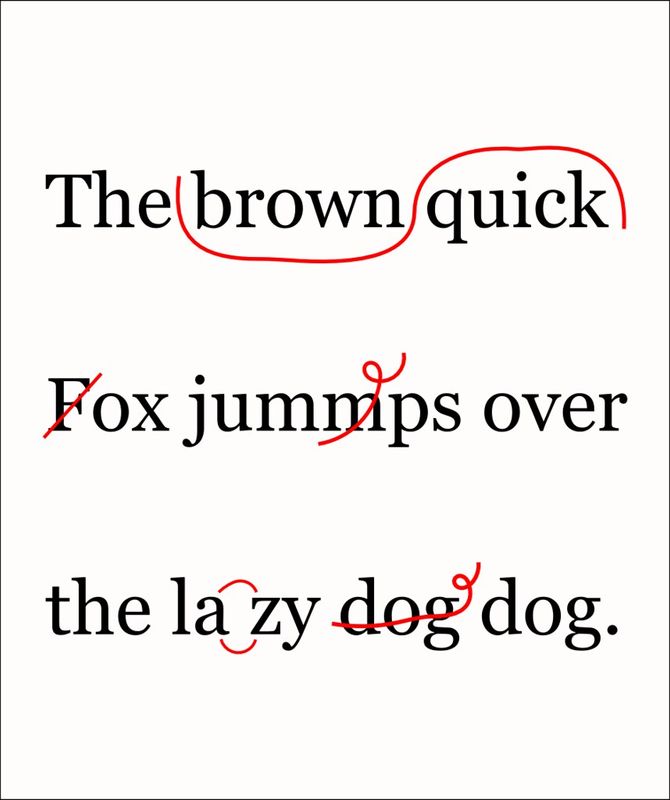
Score 0.657, shortlisted and chosen. Typeset lines with red proofreading marks, 67,848 bytes. The lowest score of the four.
The score measures cost, relevance to the words typed, image size and licence class. It does not measure fit. For the first candidate it is 0.667 for cost times 0.35, plus 1.0 for relevance times 0.30, plus 0.546 for quality times 0.20, plus 0.9 for licence times 0.15, which gives 0.778. The picture that scored highest was a park sign, and the one the editor chose scored lowest. Each state change was recorded with its reason in the bank.
Example 2
Importing the pick, and where the credit lives
The search had already stored a copy of the proofreading marks picture, so this import shows the path and adds control over size. It named the picture's web address, set max_dimension_px to 800 and stated the licence in full: permissive, CC BY 2.0, the licence link, the credit sentence and commercial use allowed.
The result was a JPEG of 670 by 800 pixels, resized from 858 by 1,024, at 42,372 bytes against the search copy's 67,848. The stored record keeps the source address, the licence block exactly as stated, the time of import, and the original and stored dimensions. A new candidate appeared in the bank in the state kept, marked as a URL import and scoring 1 on all four measures. An import has no query to be scored against, so treat that 1 as a placeholder. The editor then set it to selected.
The licence is stored with the file. It is not copied into the article. An article node's image has alt text, a caption and a title and no licence field, so the credit has to be written into the caption, as below. The article's hero image has no caption at all, so a photograph that requires credit does not belong in the hero slot. The hero of this page is a diagram drawn for it.
Example 3
Drawing the credit onto the picture
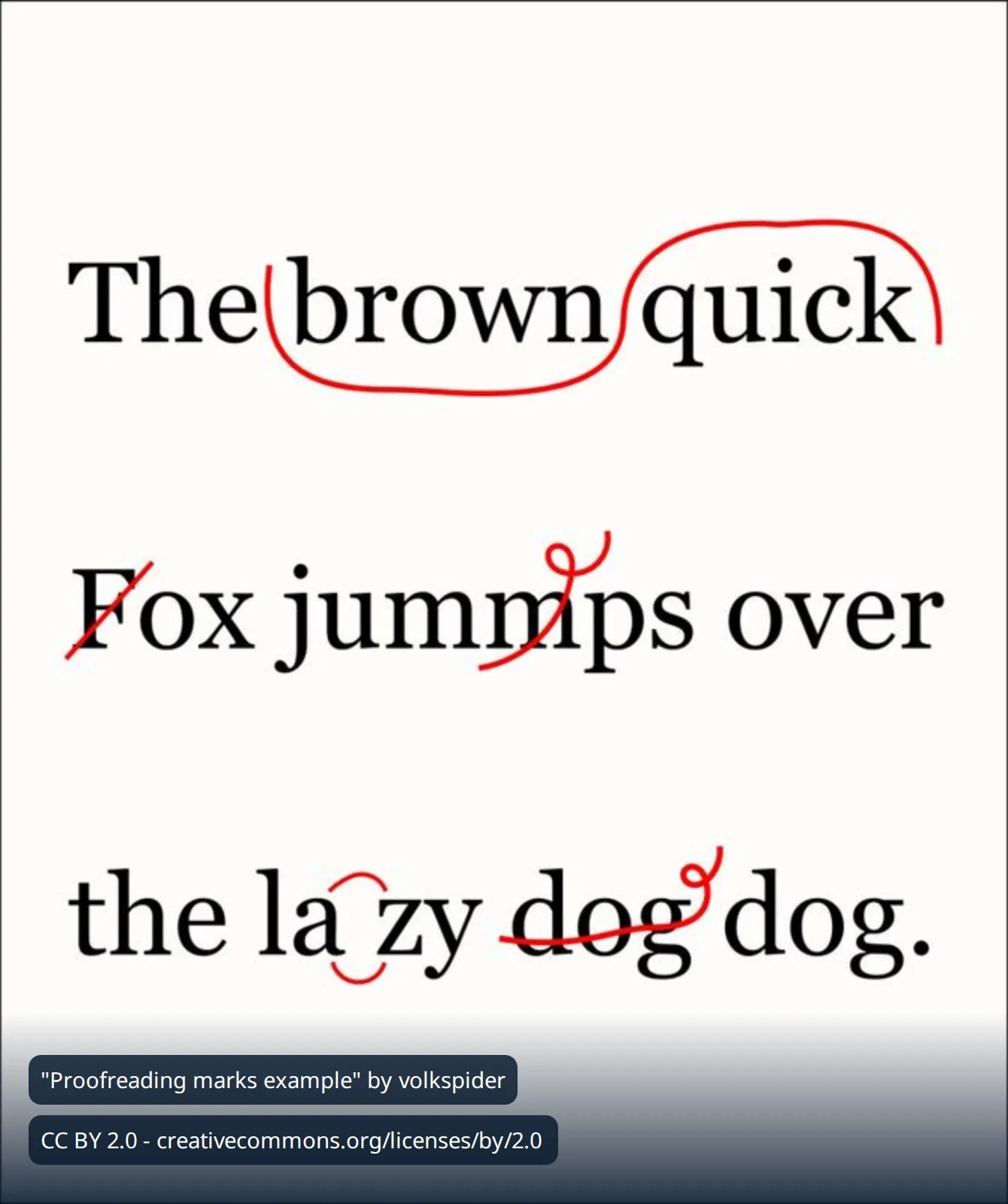
For a picture that travels without its caption, such as a social card, the credit can be drawn onto the image. annotate_image does this without calling a model. Here it laid a dark band and two lines of text over the imported photograph. The render report came back with no warnings, and the file is 54,302 bytes, inside the 153,600-byte budget.
Two cautions from the same work. The derived image records only a pointer to its source file, not the licence, so the credit on the pixels is the only attribution that travels with it. And the text check, check_image_text, reported the credit text as missing even though the text is plainly legible in the picture. For light text on a dark band, look at the image; do not rely on the check alone.
Example 4
What an import checks, and what it does not
Two imports were refused on purpose, and one was accepted that a stricter tool might have refused.
An http address. Refused with: url must use https. Nothing was stored.
An ordinary web page. Refused with: URL is a zip archive or folder page; use import_images_from_url for batch imports. The page was not a folder, but the message sends you to the batch tool. Nothing was stored.
No licence stated. Accepted. The import of the alternate picture, with no licence given, stored the licence as class unknown and commercial use unknown. The search policy excludes unknown licences from search results, but the import tool does not refuse one. Decide the licence before you import.
That third import also had a side effect. The search had stored the same picture under a Creative Commons credit, and the import produced identical bytes, so it landed on the same stored file. The file's own record now says licence unknown, while the bank entry from the search still carries the credit. This was observed on 2026-10-15 and whether it is intended was not confirmed. The safe habit is to state the licence on every import, including a second import of a picture you already hold.
What an import checks, as observed or described by the tool: the address must be https, it must be a single image rather than an archive or folder page, the size cap applies (the tool takes max_bytes up to 5,000,000), and the longest edge can be capped without cropping. What it does not check: whether the licence you state is true, whether people are pictured, or whether the picture is the right one.
Verification
Verification
Before an image goes into the article, check four things.
The bank. get_image_search_bank shows each candidate in the state you set. Here the credited import reads selected and the two shortlisted search copies still read pending_review.
The stored record. get_artifact_metadata on the file shows the licence block that travels with it. Read it, because it can differ from the bank, as Example 4 shows.
The address. Files are served at their /img/ address as soon as they are stored, before any release. On 2026-10-15 all four candidates returned HTTP 200 straight after the search. After the park sign was discarded without deleting it, it still returned 200. The candidate discarded with deletion returned not found.
The size. The image budget on this site is 153,600 bytes, with WebP preferred. Validating an article that embeds an oversize file raises a warning that does not block saving or publishing: "is 228662 bytes — over the 153600-byte image budget". The search had stored that JPEG without complaint.
Then validate the article. Publishing it exports the article dark. The pictures are readable at their addresses already, but the article is not live until a release.
Failure recovery
Failure recovery
Each entry gives what you see, the state it leaves and the next safe operation.
Write rate limit: 60 writes per 10 minutes, per member. Wait 212s and try again. Nothing was written by that call. Wait the stated time and repeat the same call. It appeared three times while this article was written, twice when shortlisting and once when drawing the diagram, because several writers shared one login.
Complete, with no candidates. The job finished and found nothing that passed the filters. Rephrase with fewer, plainer words and read the diagnostics. Each search counts towards the limit of four per request.
Complete, with a timeout diagnostic. The text is: provider query failed: provider request timed out after 20000ms. One provider did not answer, and the job still reports complete. Repeat the search later.
Image search job not found. The job id is wrong or from another site. Use the id search_images returned, with this site's id.
No image search bank found for request. Nothing has been searched or imported for that request. The same message came back for a made-up request id and for a candidate update on a request with no bank, so it does not say which cause applies. Run a search or an import first.
Import refused: url must use https. Nothing stored. Use the https form of the address.
Import refused: URL is a zip archive or folder page. Nothing stored. Find the direct address of the image file. Use the batch tool only for archives and folder listings.
Rejected but still public. Discarding a candidate changes its state and leaves the file reachable at its address. Discard with delete_artifact set to true to remove the file. The tool description says library-origin candidates are never deleted.
Slot lookup fails for an imported image. The slot option on an import is accepted, but reading it back with the slot tool returned: artifactReference contains a remote URL at metadata.import.sourceUrl. Use the public address from the import result instead of a slot.
Licence record says unknown after a re-import. See Example 4. Import the same address again with the licence stated; the file's record is written by the latest import.
Boundary
What these tools do not decide
They do not verify a licence. The credit sentences in these examples came from Openverse's own metadata. An attempt to read the source page and confirm the licence was blocked in this session, so the CC BY 2.0 status of the photograph shown here is unverified. Check the source page before you rely on a licence.
A Creative Commons licence covers the photographer's copyright. It is not a release from the people in the picture.
They do not decide fit. A high score means a cheap, large, well-licensed match to the words typed.
They do not write the credit into the article. Whether a theme prints captions on the live page was not verified, because this article has not been released. When an image owned by another article is embedded by reference, the article records its source and licence as the binder's own claim, and the validator always reports that it cannot check them.
Searching and importing store files at once. Neither releases a site.
Related reading
Other articles in this series on images and PDFs:
Download any article as a PDF: templates, kinds and the quality check
Labels, arrows and callouts on images: annotating without a designer
One image, every screen: resizing, smart crops, splits and layouts
Checking images against the brand: colour, contrast, sharpness and logo placement
Editing PDFs without a designer: page numbers, watermarks, merging, text and forms
AI images in your site's own style: brand imagery, routing, candidates and edits
Image credit: "Proofreading marks example" by volkspider, licensed under CC BY 2.0. Source page. Resized, and in Example 3 overlaid with a credit line. The diagram at the top was drawn for this article.